

Reliable internet is no longer a luxury, it’s a job requirement. If you work remotely and don’t have access to fiber or cable connections, you’ve probably wondered whether Starlink could be your answer. The promise of high-speed satellite internet sounds appealing, but does it actually deliver for work-from-home professionals?
Starlink can be trustworthy for remote work, but it depends on your specific job requirements, location, and whether you can tolerate occasional outages. The service has improved significantly, and many users report speeds and latency suitable for most office tasks. But, it’s not a perfect solution for everyone, and you’ll need to understand its real-world performance before making the switch.
This review breaks down what you need to know about using Starlink for work, including its actual speeds, reliability, costs, and how it stacks up against traditional internet options.
How Starlink Works and What It Promises
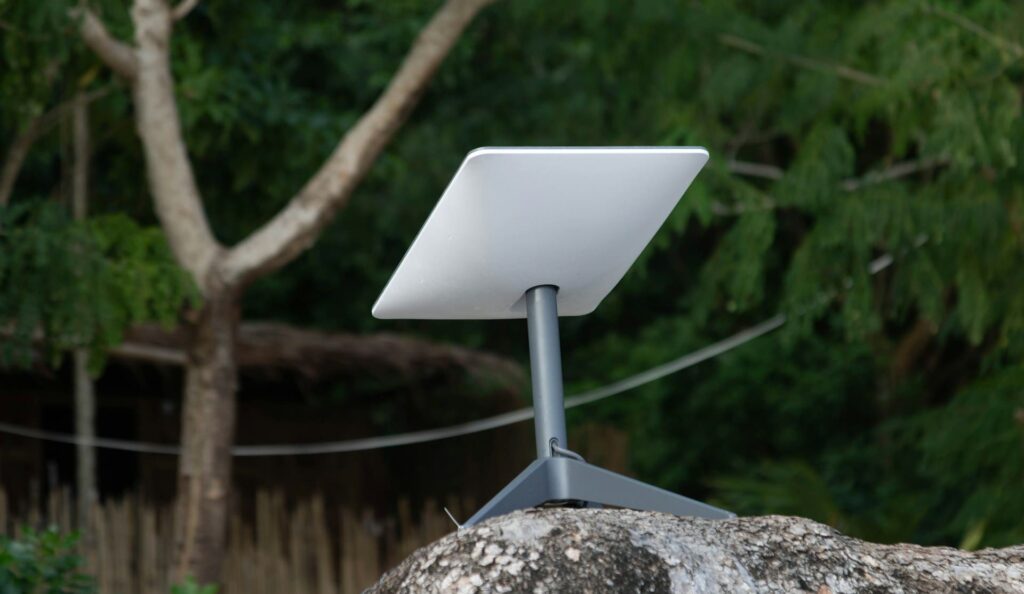
Starlink is a satellite internet service operated by SpaceX. Instead of using ground-based infrastructure like cable or fiber, it beams internet to you through a network of satellites orbiting Earth. The basic setup involves a satellite dish (called a “Dishy”) pointed at the sky, a router, and mounting hardware.
The promise is simple: you get broadband speeds anywhere on Earth without waiting for ISPs to lay cable to your neighborhood. For people in rural areas or underserved regions, this is genuinely revolutionary. SpaceX launched thousands of satellites into low-earth orbit specifically to provide this coverage.
When you sign up, you get the hardware, installation instructions, and service. The satellite dish communicates with the orbiting constellation, which then connects to internet servers. On paper, this sounds efficient. In practice, several factors affect whether it works for your job.
Speed, Latency, and Coverage: The Technical Reality
Understanding Starlink’s technical performance is crucial before using it for work. Three metrics matter most: download speeds, latency, and whether the service is available where you are.
Speed Performance
Starlink currently advertises download speeds between 50 and 150 Mbps for most users. Real-world tests show many users achieve 100–150 Mbps during off-peak hours. Upload speeds typically range from 10 to 20 Mbps.
For most remote work, email, video calls, document editing, these speeds are more than adequate. You won’t notice a difference between Starlink’s 100 Mbps and a cable connection’s 200 Mbps when you’re just using productivity software. But, if your job involves uploading large files (video editing, 3D rendering, or managing massive datasets), those slower upload speeds matter. A 500 MB file takes roughly 3–4 minutes to upload on Starlink, whereas fiber might do it in seconds.
Speed also varies by location and time of day. During peak evening hours, you might see drops to 50–80 Mbps if your area is congested. Starlink continues to launch satellites and upgrade software, so performance improves regularly.
Latency and Reliability for Work
Latency, the time it takes for data to travel from your device to a server and back, is critical for certain work tasks. Video conferencing is particularly sensitive to latency. Starlink’s latency typically ranges from 20 to 40 milliseconds, which is acceptable for Zoom, Teams, or Google Meet.
Traditional cable internet has latency around 10–20 ms, so Starlink is slightly higher but rarely noticeable in practice. You won’t experience the lag or echo that would make calls difficult.
Reliability, but, requires nuance. Starlink’s satellite network has become increasingly stable, but complete outages still occur. Weather, especially heavy rain or snow, can temporarily disrupt service. Some users report 99%+ uptime, while others in different regions experience occasional 5–10 minute interruptions weekly. This variance depends heavily on your specific location and local conditions.
Coverage and Availability
Before you buy, check coverage at your address on Starlink’s website. Service isn’t available everywhere yet. In most U.S. urban and suburban areas, it’s available now. Rural areas have better coverage than ever, but remote locations may still have limited or no service.
Availability also depends on your roof’s orientation and obstructions. Trees, buildings, or hills blocking the southern sky (where the satellites pass) can degrade or prevent service. This is a major limitation that traditional internet doesn’t face.
Starlink for Remote Work: Practical Considerations
Technical specs matter, but real-world work scenarios matter more. Let’s examine how Starlink performs for common job tasks.
Video Conferencing and Communication Tools
Most remote work involves video calls. Starlink handles this well. The latency is low enough that conversations feel natural, and the bandwidth is sufficient for HD video. Even with multiple video calls running simultaneously, you won’t typically experience stuttering or disconnections.
One caveat: if your workplace requires constant video (like some customer-service roles), continuous background video consumption on top of regular work might stress the connection during peak hours. Test this during your service trial if possible.
File Uploads and Cloud Collaboration
Google Docs, Notion, Slack, and similar cloud tools work without problems on Starlink. These services don’t demand much bandwidth. The 10–20 Mbps upload speed is sufficient for realtime collaboration.
But, if you regularly upload large files (presentations over 100 MB, video files, or design assets), you’ll feel the difference. A project that takes 30 seconds on fiber might take 3–5 minutes on Starlink. This adds up if you’re uploading multiple times daily.
Network Stability During Work Hours
One user reported consistent service between 9 AM and 5 PM, with only one brief interruption in three months. Another user in a congested area experienced 2–3 minute outages roughly twice weekly during evening hours.
The real issue isn’t typically the average user, it’s that one unpredictable outage during an important meeting. If your job requires 99.9%+ uptime (financial trading, emergency dispatch, critical infrastructure), Starlink still isn’t the primary option. For standard office work where occasional brief interruptions are tolerable, it’s usually fine.
Cost, Installation, and Ongoing Expenses
Starlink’s pricing structure is straightforward but involves upfront costs.
The standard equipment costs $599 upfront, which includes the satellite dish, router, and cables. Monthly service runs $120 for the standard residential plan. Professional plans exist for businesses but cost significantly more.
Installation is typically a DIY process. You mount the dish, run cables indoors, and connect the router. This usually takes under an hour. If you hire a professional installer, expect to pay extra, roughly $500–$1,000 depending on your location and roof complexity.
Compare this to traditional ISPs: cable might cost $80–$120 monthly with no equipment fee if you already have infrastructure. But if cable isn’t available where you live, Starlink’s $599 hardware plus $120/month is far cheaper than paying for a cell hotspot indefinitely or moving to a different location.
There’s also the Starlink Pro plan for $500/month if you need guaranteed bandwidth, but that’s designed for businesses with specific requirements.
| Factor | Starlink | Cable/Fiber (if available) |
|---|---|---|
| Upfront Hardware | $599 | Often Free or $50–$100 |
| Monthly Service | $120 | $80–$120 |
| Installation Cost | $0–$1,000 (DIY or pro) | $0–$150 |
| Availability | Most areas | Urban/suburban primarily |
| Typical Speeds | 100–150 Mbps | 200+ Mbps |
For someone in a rural area without cable access, Starlink represents a genuine value proposition. For someone in a city, traditional internet might be cheaper and faster, so the decision becomes about availability rather than cost.
Comparing Starlink to Traditional Internet Options
How does Starlink stack up against what you might already have access to?
Vsus Cable: Cable internet is faster (200+ Mbps) and typically has lower latency (10–15 ms). But cable isn’t available everywhere. In areas where it exists, cable usually wins on speed and stability. Starlink’s advantage is availability where cable doesn’t exist.
Versus Fiber: Fiber is the gold standard. It offers gigabit speeds, minimal latency, and exceptional reliability. If fiber is available to you, choose it over Starlink. Fiber costs similarly ($100–$150/month) but delivers superior performance. The problem is fiber only covers about 37% of the U.S. population currently.
Versus 5G Home Internet: T-Mobile, Verizon, and other carriers now offer home internet using 5G networks. These services cost $50–$80 monthly with no equipment fee, making them cheaper than Starlink. But, 5G coverage varies widely. In dense urban areas, 5G home internet can be excellent. In rural areas, it’s often unavailable. 5G latency is also slightly higher (40–50 ms) compared to Starlink. If you have reliable 5G coverage, it might be a better choice than Starlink.
Versus Mobile Hotspot: Using your phone’s hotspot is cheaper initially ($50–$100/month for unlimited data), but data caps and throttling make this unsuitable for full-time remote work.
Starlink’s sweet spot is rural and suburban areas without fiber or cable, where 5G coverage is also weak.
When Starlink Makes Sense for Work
Starlink is the right choice if you meet certain criteria.
You should consider Starlink if you’re in a location without cable or fiber access, your job doesn’t require absolute 100% uptime, and you can tolerate occasional latency spikes. Remote roles involving email, document editing, video calls, and standard software work are perfect fits.
You also benefit from Starlink if you work across multiple time zones and your company operates 24/7. The satellite network doesn’t throttle specific users during peak hours the way some cable ISPs do, so your service remains consistent.
Also, if you frequently relocate for work or travel long-term, Starlink’s portability is valuable. You can take your equipment to different homes or even offices.
Starlink is less suitable if your job requires backup redundancy (financial services, emergency services), if you do heavy video editing or design work, or if you live in an area with severe weather (heavy snow, frequent thunderstorms).
Your specific job duties matter. A freelance writer working with Google Docs and email is perfectly fine. A trader managing millisecond-sensitive transactions is not.
Potential Drawbacks and Limitations
No service is perfect. Here are Starlink’s real limitations.
Weather Sensitivity: Heavy rain, snow, or ice can interrupt service. Users in areas with frequent storms experience more disruptions than those in drier climates. A 10-minute rainstorm might knock your connection out for 5–15 minutes.
Occasional Outages: Satellite networks require maintenance. Starlink occasionally takes satellites offline for updates. These events cause brief outages affecting all users. This is rare but does happen.
Upfront Cost: The $599 hardware investment is substantial. If you want to trial the service, you’re committing to this cost. Most providers offer 30-day trial returns, but you’ll pay shipping.
Network Congestion: As Starlink adds users in your area, speeds can degrade. In congested areas, peak-hour speeds sometimes drop below 50 Mbps. Starlink addresses this by expanding capacity, but it’s an ongoing challenge.
No Backup: If Starlink goes down, you lose internet entirely. Dual-WAN configurations (combining Starlink with a cellular backup) are possible but add complexity and cost.
Obstructions: Trees, buildings, and terrain can block satellites. This is unforgiving in densely wooded areas or canyons. Cable and fiber don’t have this problem.
These drawbacks aren’t disqualifying for most jobs, but they’re worth understanding before committing.
Is Starlink Trustworthy for Your Job?
Trust means reliability and consistency. Does Starlink deliver?
For standard remote work, yes. Thousands of remote workers successfully use Starlink daily. The service has matured significantly since launch, and SpaceX continues investing in reliability improvements. User satisfaction rates are high, especially among people without alternative options.
But, trust is conditional. You need to:
- Check availability at your exact address before purchasing.
- Ensure your roof has an unobstructed southern view.
- Understand that occasional outages (even brief ones) may occur.
- Have a backup plan for critical meetings or deadlines.
- Accept that upload speeds are slower than traditional internet.
If you meet these conditions and work a job that tolerates occasional brief interruptions, Starlink is trustworthy. Many users report better reliability than they expected.
If your job absolutely cannot tolerate any downtime, or if you live in an area with severe weather, you should explore alternatives first or keep a cellular backup ready.
For most remote work scenarios, Starlink has earned its reliability reputation. The key is honest self-assessment of your needs.
Frequently Asked Questions
Is Starlink reliable enough for remote work and video conferencing?
Yes, Starlink is suitable for most remote work. It offers 20-40ms latency, which is acceptable for video calls on Zoom, Teams, or Google Meet. Speeds of 100-150 Mbps support email, document editing, and multi-call scenarios. However, reliability varies by location; some users report 99%+ uptime, while others experience occasional 5-10 minute interruptions weekly depending on weather and congestion.
What are the actual Starlink download speeds compared to cable internet?
Starlink advertises 50-150 Mbps downloads, with real-world testing showing 100-150 Mbps during off-peak hours. Cable internet typically delivers 200+ Mbps with lower latency (10-15ms). While Starlink is slower, speeds are adequate for standard office tasks. Peak-hour speeds may drop to 50-80 Mbps in congested areas, whereas upload speeds are slower at 10-20 Mbps.
How much does Starlink cost, and what’s included in the setup?
Starlink requires a $599 upfront hardware investment (satellite dish, router, cables) and $120 monthly service for the standard residential plan. DIY installation is free, but professional installation costs $500-$1,000. This is competitive with cable ($80-$120/month) where available, but Starlink’s advantage is availability in rural and underserved areas without cable or fiber access.
Can Starlink be affected by weather, and how often do outages occur?
Yes, heavy rain, snow, and ice can temporarily disrupt Starlink service for 5-15 minutes during storms. Complete outages also occur occasionally during satellite maintenance. Weather sensitivity depends on your climate; users in dry areas experience fewer disruptions. While not ideal for jobs requiring 99.9%+ uptime, brief interruptions are tolerable for standard remote work roles.
How does Starlink compare to 5G home internet for remote workers?
5G home internet costs less ($50-$80/month with no equipment fee) but has higher latency (40-50ms) and unreliable rural coverage. Starlink costs more ($120/month plus $599 hardware) but offers better rural availability and lower latency. 5G is preferable in dense urban areas with strong coverage; Starlink excels in rural and suburban locations without fiber or cable access.
What jobs or work types are not suitable for Starlink internet?
Starlink isn’t ideal for roles requiring absolute 100% uptime, such as financial trading, emergency dispatch, or critical infrastructure management. Heavy file uploaders (video editors, 3D rendering artists) may struggle with 10-20 Mbps upload speeds. Jobs in areas with severe weather, frequent storms, or those requiring low-latency transactions should explore alternatives or maintain cellular backup.
Read More:

Susan is a professional writer. She has been a writer for eight years and has always been so fulfilled with her work! She desires to share helpful, reliable, and unbiased information and tips about tech and gadgets. She hopes to offer informative content that can answer users’ questions and help them fix their problems.