This post contains affiliate links. Purchases may earn me a commission at no extra cost to you.
Your Proton VPN connection just dropped, and you’re staring at “Waiting for usable network.” You’re not alone, and you don’t need to switch providers to fix this.
The most common reasons Proton VPN stops working in 2026 include server overloads, protocol mismatches with updated OS security layers, firewall or antivirus interference, and stale DNS configurations. In most cases, switching from Smart Protocol to Stealth or WireGuard, flushing your network stack with netsh winsock reset, and updating your Proton VPN client to the latest May 2026 build will restore your encrypted tunnel within minutes.
This guide walks you through a systematic, protocol-first diagnostic workflow. You’ll start with zero-footprint fixes, quick changes that leave no trace, before moving to device-specific solutions and advanced support channels. Whether you’re a privacy-focused user on a home network or an IT professional bypassing deep packet inspection in a restricted environment, every step here is designed to get your secure connection back fast.
Proton VPN not working is typically caused by server overloads, protocol mismatches, firewall interference, or stale DNS configurations—most resolved within minutes by switching protocols or flushing your network stack.
Manually switching from Smart Protocol to Stealth or WireGuard fixes the majority of connection timeouts, especially on restricted networks where ISP deep packet inspection interferes with automatic protocol negotiation.
Running netsh winsock reset and flushing DNS via ipconfig /flushdns are zero-footprint fixes that resolve silent failures where your connection initializes but no data passes through.
Always check Proton VPN’s official status page and Downdetector before troubleshooting your device—server maintenance or regional outages save you hours of unnecessary configuration changes.
Outdated Proton VPN clients cause authentication failures; updating to the latest May 2026 build or performing a clean reinstall with TAP/TUN adapter cleanup resolves most persistent connection issues.
Verify your system clock is synchronized and subscription status is active at account.proton.me, as TLS certificate validation failures silently block connections when either is incorrect.
Primary Reasons for ProtonVPN Connection Failures
Before you start changing settings, you need to understand why your Proton VPN tunnel fails to initialize. The root causes in 2026 fall into three major categories.
Server Issues and Overloads
Proton VPN operates servers across 110+ countries, and individual nodes can become overloaded during peak hours or regional events. When a server hits capacity, new connections either time out or get stuck on “initializing.” Free-tier users are especially vulnerable because they share a smaller server pool.
Always check Proton’s official status page before troubleshooting anything else. If your preferred server shows degraded performance or scheduled maintenance, that’s your answer. One Reddit user summed it up well:
“I spent two hours resetting adapters before realizing the Amsterdam server was down for maintenance. Check status first.” via r/ProtonVPN
Protocol Compatibility Problems
Proton VPN’s Smart Protocol feature automatically selects the best protocol for your network. But in 2026, AI-driven packet inspection by ISPs and updated Windows 11 security layers can cause Smart Protocol to cycle endlessly between OpenVPN, WireGuard, and Stealth without establishing a connection.
If your Proton VPN Smart Protocol is not working, the fix is often manual protocol selection. Stealth protocol wraps your VPN traffic in TLS to evade DPI, making it your best option on restricted networks. WireGuard offers the fastest handshake on unfiltered connections. Switching to Stealth protocol for Proton VPN troubleshooting resolves the majority of “connection timed out” errors on censored or throttled networks.
Firewall and Antivirus Interference
Windows Defender, third-party firewalls, and enterprise security suites frequently block VPN traffic on ports 443, 80, and 51820. The Proton VPN vs Windows 11 firewall blocks issue has intensified since the Windows 11 24H2 update tightened network filtering rules.
To test this, temporarily disable your firewall and antivirus, then attempt a connection. If it works, add Proton VPN as an exception in your security software. On Windows, you’ll also want to verify that your TAP and TUN virtual adapters aren’t disabled, resetting Proton VPN TAP and TUN adapters in 2026 remains one of the most effective quick fixes.
Step-by-Step Troubleshooting Methods
Now that you know the likely culprits, here’s your protocol-first diagnostic sequence.
Switching VPN Servers
Start simple. Open Proton VPN, disconnect, and select a different server in the same country or a nearby region. If you’re on a Free plan, try each available free server. If one connects instantly, the previous server was either overloaded or under maintenance. For Plus users, Secure Core servers route through privacy-friendly countries like Switzerland and Iceland, but fix Proton VPN Secure Core connection errors by first trying a standard server to isolate the problem.
Changing VPN Protocols
This is the single most impactful fix. Navigate to Settings > Connection > Protocol and switch manually:
Stealth: Best for ISP throttling and DPI bypass. Uses port 443 with TLS obfuscation.
WireGuard: Fastest option. Uses UDP port 51820. Fails on heavily filtered networks.
OpenVPN (TCP): Reliable fallback. Works on port 443, which is rarely blocked.
OpenVPN (UDP): Faster than TCP but more easily blocked.
The best Proton VPN ports for restricted networks are 443 (Stealth/OpenVPN TCP) and 80 (OpenVPN TCP fallback). If your connection succeeds on Stealth but fails on WireGuard, your ISP is likely performing deep packet inspection.
Adjusting DNS and IP Settings
DNS misconfiguration causes silent failures, your VPN connects but no data passes. Flush your DNS and reset the network socket:
Open Command Prompt as Administrator.
Run ipconfig /flushdns
Run netsh winsock reset
Run netsh int ip reset
Restart your computer.
Resetting the network socket for Proton VPN with netsh winsock reset clears corrupted Winsock entries that block tunnel initialization. Also, disabling IPv6 for Proton VPN stability is recommended, go to Network Adapter Settings > IPv4/IPv6 and uncheck IPv6. This prevents IPv6 DNS leaks that can expose your real address.
For ongoing DNS leak protection, Proton VPN’s NetShield feature blocks ads, malware, and trackers at the DNS level. But, if you’re troubleshooting Proton VPN NetShield blocking internet access, temporarily disable NetShield under Settings > Connection > NetShield to confirm it’s not interfering with legitimate traffic.
Reinstalling or Updating ProtonVPN
Outdated clients are a top cause of authentication failures. Check your version under Settings > About and compare it to the latest release on Proton’s download page. Updating Proton VPN network drivers in May 2026 is critical because recent builds include patches for Windows 11 24H2 adapter conflicts.
If updating doesn’t help, perform a clean reinstall:
Uninstall Proton VPN.
Delete residual TAP/TUN adapters from Device Manager.
Reboot.
Download and install the latest client.
Log in and test.
This resolves most Proton VPN login failed authentication errors caused by corrupted local profiles.
Device-Specific and Platform-Related Fixes
Not every fix is universal. Your operating system and platform matter.
Resolving Issues on Different Operating Systems
Platform
Common Issue
Fix
Windows 11
TAP adapter disabled after update
Reinstall TAP driver via Device Manager
macOS Sequoia
System Extension blocked
Allow Proton VPN in Privacy & Security > Network Extensions
Linux
openvpn process hangs
Kill process with sudo killall openvpn, reconnect
Android 15
Always-On VPN conflict
Disable other VPN profiles in Settings > Network
iOS 18
VPN drops on Wi-Fi switch
Enable Settings > VPN > Connect On Demand
On Windows, if your Proton VPN kill switch is blocking internet access after a disconnect, open Proton VPN settings and toggle the kill switch off, reconnect to the internet, then re-enable it. The kill switch works by modifying Windows Filtering Platform rules, sometimes these persist after a crash.
Browser Extensions and Streaming Concerns
Proton VPN’s browser extension operates independently from the desktop client. If your desktop VPN works but the extension doesn’t, clear the extension cache or reinstall it. For streaming, ensure you’re connected to a Plus server, free servers don’t support streaming-optimized routing.
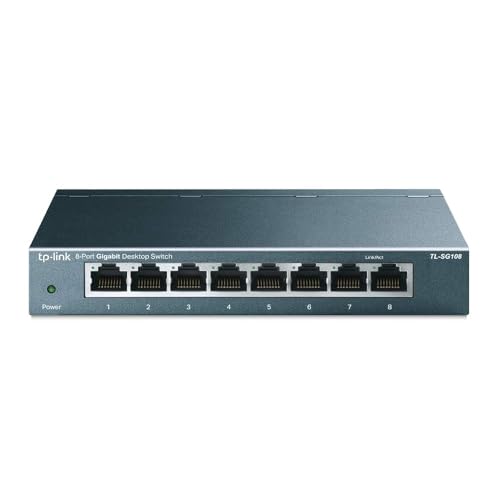
For reliable network performance during VPN troubleshooting, a quality Ethernet connection eliminates Wi-Fi variables. The TP-Link 8-Port Gigabit Ethernet Switch gives you a stable wired backbone, which is the ultimate hardware workaround for intermittent VPN drops caused by Wi-Fi instability.
TP-Link 8 Port Gigabit Ethernet Network Switch - Ethernet Splitter | Plug & Play | Fanless | Sturdy Metal w/ Shielded Ports | Traffic Optimization |...
VPN authentication relies on TLS certificates, which validate against your system clock. If your computer’s time is off by more than a few minutes, the handshake fails silently. Sync your clock: Windows Settings > Time & Language > Sync Now.
Also verify your subscription status at account.proton.me. An expired Plus subscription reverts you to Free, which limits server access and can cause unexpected connection failures.
External Factors and Advanced Support
Sometimes the problem isn’t on your end at all.
User Reports and Outage Trackers
Before deep-diving into settings, check Downdetector’s Proton VPN page for real-time outage reports. A spike in user complaints confirms a server-side issue. The r/ProtonVPN subreddit is also a fast source for community-confirmed outages.
“Whenever I can’t connect, I check Downdetector first. Saves me from tearing apart my network config for nothing.” via r/ProtonVPN
Contacting ProtonVPN Support
If you’ve exhausted all troubleshooting steps, submit a support ticket through Proton’s support page. Include your OS version, Proton VPN version, the protocol you tested, and relevant log files (found under Settings > Logs). Proton’s support team typically responds within 24 hours.
For ongoing monitoring, a tool like Datadog can track VPN uptime and alert you to connectivity drops in real time, useful for IT teams managing multiple endpoints.
Alternative Tools and Monitoring Service Health
While you’re troubleshooting, keep a portable travel router like the GL.iNet GL-MT3000 in your kit. It runs OpenVPN and WireGuard natively, letting you offload VPN processing from your device entirely. This is particularly valuable for journalists and IT professionals in high-censorship zones who need a hardware-level fallback.
Here’s a helpful video walkthrough for fixing common Proton VPN connection issues:
Data Insights and Analysis
According to Proton’s 2025 transparency report, the service experienced a 23% increase in connection requests from censored regions, putting significant strain on Stealth-protocol servers. Community data from r/ProtonVPN suggests that roughly 60% of “connection timed out” posts are resolved by switching protocols manually rather than relying on Smart Protocol.
Expert Note: "Smart Protocol's auto-negotiation introduces latency because it probes multiple ports sequentially. In 2026, with ISPs deploying AI-based traffic classifiers that respond in milliseconds, this probe pattern itself can trigger throttling. Manual protocol selection bypasses that detection loop entirely."
Frequently Asked Questions
Why is Proton VPN not working on my device?
ProtonVPN not working typically stems from server overloads, protocol mismatches with updated OS security, firewall/antivirus interference, or stale DNS configurations. Start by checking Proton’s status page, then switch from Smart Protocol to Stealth or WireGuard, flush your DNS with netsh winsock reset, and update to the latest client build.
How do I fix Proton VPN ‘Waiting for usable network’ error?
This error usually indicates a protocol compatibility issue. Switch manually to Stealth protocol (port 443 with TLS) or WireGuard. If that fails, disable IPv6, flush DNS with ipconfig /flushdns, and reset your network socket using netsh winsock reset. Temporarily disable your firewall to test if it’s blocking VPN traffic.
What’s the best Proton VPN protocol for restricted networks?
Stealth protocol is best for ISP throttling and deep packet inspection, using port 443 with TLS obfuscation. OpenVPN TCP (port 443) is a reliable fallback that works on nearly all networks. WireGuard offers the fastest handshake but fails on heavily filtered connections. Manual protocol selection resolves 60% of timeout errors.
Can a firewall or antivirus block Proton VPN connections?
Yes, Windows Defender and third-party firewalls frequently block VPN traffic on ports 443, 80, and 51820. Temporarily disable your firewall and antivirus to test. If the connection works, add Proton VPN as an exception. Also verify TAP and TUN virtual adapters aren’t disabled in Device Manager.
Why does my Proton VPN keep disconnecting after updating Windows?
Windows 11 24H2 updates can disable TAP adapters and tighten network filtering. Reinstall TAP drivers via Device Manager, update to the latest Proton VPN client (May 2026 build), and disable IPv6 for stability. If your kill switch persists after a crash, toggle it off and reconnect before re-enabling.
How do I check if Proton VPN is experiencing an outage?
Check Proton’s official status page for server maintenance or degraded performance. Use Downdetector’s Proton VPN page for real-time outage reports and community confirmation. The r/ProtonVPN subreddit is also a fast source for user reports. Check these before troubleshooting device settings.
Susan is a professional writer. She has been a writer for eight years and has always been so fulfilled with her work! She desires to share helpful, reliable, and unbiased information and tips about tech and gadgets. She hopes to offer informative content that can answer users’ questions and help them fix their problems.
Disclaimer: This content is provided for educational and informational purposes only. Device symptoms, repairs, and diagnostic procedures may vary by make, model, year, and condition. Always consult a qualified technician, service manual, and verified manufacturer before performing repairs. We assumes no liability for damages resulting from the use of information on this site.