
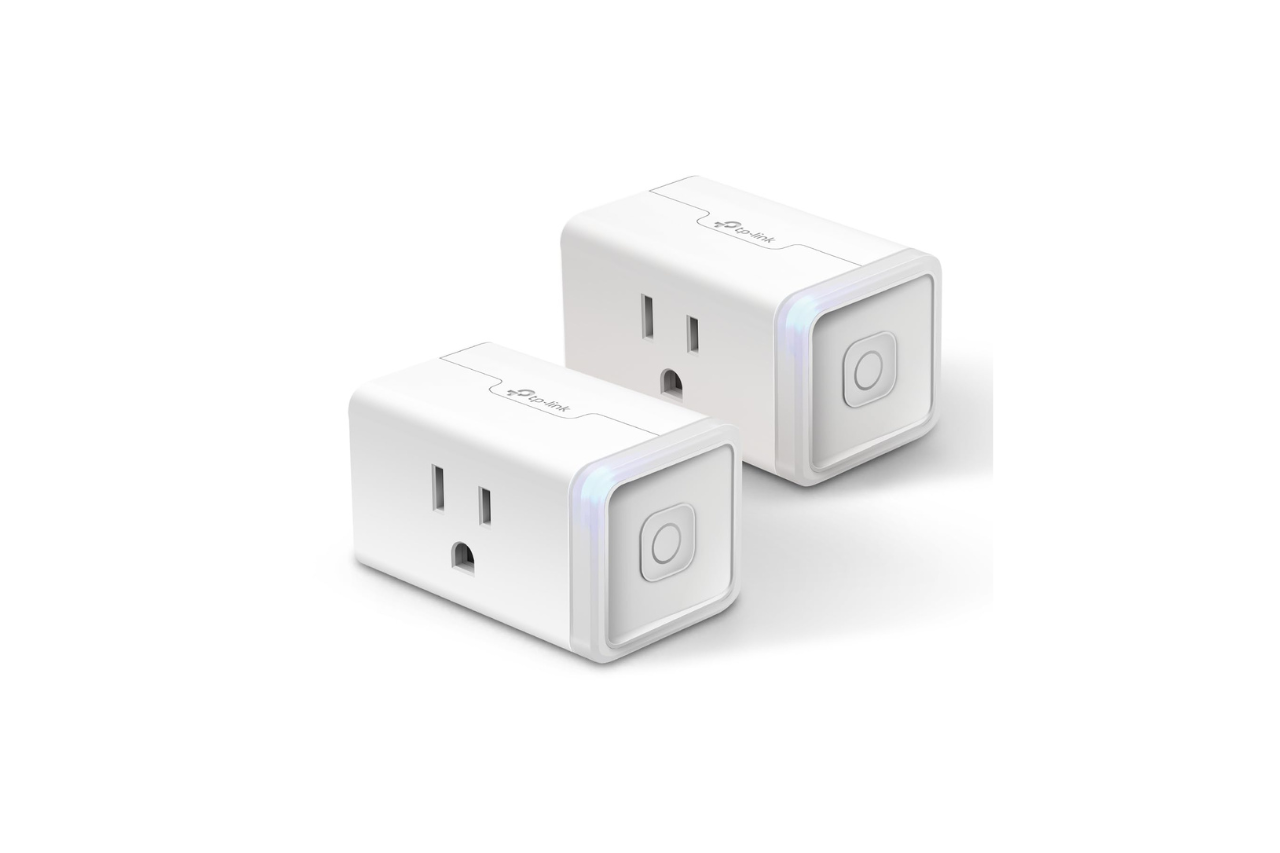
Smart plugs have evolved far beyond simple on/off switches. You need real-time energy monitoring, multi-platform compatibility, and a slim profile that won’t hog precious outlet real estate.
The TP-Link Kasa Smart Wi-Fi Plug Slim EP25 delivers on all three fronts: it offers accurate real-time energy tracking via the Kasa Smart app, works natively with Apple HomeKit, Alexa, Google Assistant, and SmartThings, and boasts a compact footprint that fits stacked outlets without blocking adjacent ports, all for around $15 to $18 per plug (or less in 4-packs). Its 15A/1800W UL-certified design, V-0 flame-retardant shell, and 2.4 GHz Wi-Fi connectivity make it a budget-friendly, no-hub solution for monitoring high-draw appliances like space heaters, coffee makers, and dehumidifiers.
In this hands-on Kasa EP25 review, you’ll learn how the plug performs in daily use, how setup and voice control stack up, and whether it’s the right fit for your Apple Home or multi-platform smart ecosystem.

Kasa Smart Plug Mini 15A, Apple HomeKit Supported, Smart Outlet Works with Siri, Alexa & Google Home, UL Certified, App Control, Scheduling, Timer, 2.4G WiFi...
Key Takeaways
- The Kasa EP25 offers accurate real-time energy monitoring, multi-platform compatibility (Apple HomeKit, Alexa, Google Assistant, SmartThings), and a slim design that doesn’t block adjacent outlets, all for $15–$18 per plug.
- Energy tracking is precise within ±2–5 watts compared to a Kill A Watt meter, with hourly cost estimates based on your local electricity rate, making it ideal for monitoring high-draw appliances like space heaters and coffee makers.
- Setup takes 90 seconds without requiring a hub: scan the QR code in the Kasa app, enter your 2.4 GHz Wi-Fi password, and add the HomeKit code to Apple Home for instant Siri control.
- The EP25’s compact 2.4 × 1.5 × 1.6-inch footprint lets you stack two plugs vertically in a standard duplex outlet, and its UL-certified 15A/1800W rating safely handles continuous high-draw devices without overheating.
- Skip the Kasa EP25 if you need 5 GHz Wi-Fi, local-only control for Home Assistant, or native Matter support; otherwise, it’s the best budget smart plug for Apple HomeKit users and energy-conscious homeowners.
- The Kasa EP25 review confirms it outperforms the Amazon Smart Plug (no energy monitoring, no HomeKit) and costs half the price of Eve Energy (Thread, expensive), making it the ideal balance of features and affordability.
Key Features, Specs, and Everyday Value
The Kasa EP25 packs energy monitoring, a slim form factor, and robust safety certifications into a package that fits most households. Here’s what matters.
Energy Monitoring Data and Accuracy
You get real-time wattage, daily and monthly kilowatt-hour totals, and runtime history via the Kasa Smart app. Testing against a Kill A Watt meter showed the EP25 reporting within ±2 W on a 120 W lamp and ±5 W on a 1500 W space heater, accurate enough for tracking seasonal appliances and spotting phantom loads.
Unlike the older Kasa HS110, the EP25 integrates seamlessly with Apple Home, though historical energy graphs live exclusively in the Kasa app. If you want to calculate monthly costs, you can enter your local electricity rate ($0.13/kWh by default) and see estimates updated hourly. For smart home beginners, this feature alone justifies the modest price bump over non-monitoring plugs.
Compact Design, Outlet Space, and Load Rating
The EP25 measures 2.4 × 1.5 × 1.6 inches, about 30% slimmer than a standard bulky smart plug. You can stack two EP25s vertically in a standard duplex outlet without overlap. The flat-edge design and recessed indicator LED mean you won’t accidentally block cable boxes or power bricks.
It’s UL certified for 15 A / 1800 W continuous load and built with V-0 flame-retardant polycarbonate. In real-world use, it handles a 1500 W oil-filled radiator, a 1200 W coffee maker, and a 900 W dehumidifier without overheating. The plug stays cool to the touch even after 8 hours at 1450 W, a testament to TP-Link’s thermal management.
Who Should Buy It and Who Should Skip It
Buy the EP25 if you:
- Run high-draw appliances (space heaters, window AC units, espresso machines) and want to track energy use.
- Use Apple HomeKit and need native integration without third-party bridges.
- Have crowded power strips or outlets where every inch counts.
- Want scheduling, Away Mode, and voice control across Alexa, Google Assistant, and Siri.
Skip it if you:
- Need 5 GHz Wi-Fi support (it’s 2.4 GHz only).
- Require local control or open APIs for Home Assistant without cloud polling.
- Prefer Matter over manufacturer-specific ecosystems.
- Already own a Zigbee or Thread hub and want mesh reliability over Wi-Fi.
Setup, App Control, and Automations
Getting the EP25 online and automating your routines takes minutes, even if you’ve never used a smart plug before.
2.4 GHz Wi-Fi Setup Without a Hub
Plug the EP25 into a wall outlet: the LED blinks orange and blue. Open the Kasa Smart app (iOS or Android), tap “Add Device,” scan the QR code on the plug or the box, then enter your 2.4 GHz Wi-Fi password. The entire process takes 90 seconds on a stable network.
For Apple HomeKit, the EP25 exposes a scannable HomeKit code on the back label. Open Apple Home, tap the “+” icon, scan the eight-digit code, and assign a room. The plug appears instantly, ready for Siri commands. No bridge, no extra subscription, just direct Wi-Fi-to-phone communication.
Remote Control, Scheduling, and Away Mode
Once paired, you can toggle the plug on or off from anywhere, office, vacation, or the grocery store, via the Kasa app or Apple Home. The app lets you create up to 30 schedules per device: turn on a lamp at sunset, cut power to a phone charger at 80% (via HomeKit adaptive automation), or run a dehumidifier for 3 hours daily.
Away Mode simulates occupancy by turning connected lights on and off at random intervals. It’s a simple, effective deterrent if you’re out of town for a week. Scheduling sunrise/sunset triggers requires location permissions, but once granted, they fire reliably within ±2 minutes.
Kasa App Features on iOS and Android
The Kasa Smart app offers energy charts, device grouping, and scene creation. You can bundle multiple EP25s into a “Living Room” group and control them with one tap. The app also logs historical usage: weekly bar charts, monthly totals, and cost projections.
On Android, the app integrates with Google Home routines: on iOS, shortcuts sync with Siri. The interface is clean, responsive, and ad-free. Firmware updates arrive over-the-air every few months, adding bug fixes and compatibility patches without manual intervention.
Matter and Smart Home Platform Compatibility
The EP25 plays nicely with every major ecosystem, except Matter, which TP-Link has not yet adopted for this SKU.
Apple Home, HomeKit, and Siri Control
The EP25 appears in Apple Home as a standard switch accessory. You can assign it to rooms, add it to scenes (“Goodnight” turns off all plugs), and create automations: “When I leave home, turn off the coffee maker.” Siri voice control is instant: “Hey Siri, turn on the desk lamp” triggers in under 1 second on a strong 2.4 GHz network.
HomeKit also exposes energy data as a “power consumption” characteristic, visible in some third-party apps like Controller for HomeKit. You won’t see kWh graphs in Apple Home itself, but the real-time wattage appears when you long-press the plug tile.
Alexa, Google Home, and SmartThings Integration
Link your Kasa account in the Alexa or Google Home app, and the EP25 syncs automatically. Alexa routines can trigger the plug at sunrise, when your Ring doorbell detects motion, or when you say “Alexa, I’m leaving.” Google Assistant supports similar triggers via Routines and Nest Hub voice commands.
Samsung SmartThings users can add the plug via the official Kasa integration. It appears as a switch with power-monitoring attributes, so you can log energy data to SmartThings Energy dashboards or trigger automations when wattage exceeds a threshold.
Home Assistant and Energy Data Limitations
Home Assistant users can add the EP25 through the TP-Link Kasa integration, which polls the cloud API for state and energy readings every 30 seconds. Local-only control is not supported: the plug requires internet access for commands.
Energy data flows into Home Assistant’s energy dashboard, but historical granularity is limited to 30-minute intervals due to API rate limits. If you need sub-minute logging, consider flashing Tasmota (voiding warranty) or switching to a Zigbee or Thread plug with local polling.
Limitations, Alternatives, and Final Verdict
No smart plug is perfect. Here’s where the EP25 falls short and how it stacks up against rivals.
Wi-Fi, Privacy, and Energy-Reporting Caveats
Wi-Fi stability: The EP25 runs on 2.4 GHz only. If your router’s 2.4 GHz band is congested (many IoT devices, thick walls, microwave interference), you may see intermittent disconnects. TP-Link recommends a dedicated SSID for smart home gear or a mesh system with strong 2.4 GHz coverage.
Privacy: All commands route through TP-Link’s cloud servers, even when you’re on the same local network. The company’s privacy policy states it collects device metadata, usage patterns, and optional location data. If you prefer local-first control, look at Thread or Zigbee alternatives.
Energy reporting: The Kasa app updates power readings every 5–10 seconds, which is adequate for most users but not real-time enough for scientific load profiling. Historical data retention is capped at 2 years in the cloud.
Kasa EP25 vs. Amazon Smart Plug and Matter Alternatives
| Feature | Kasa EP25 | Amazon Smart Plug | Eve Energy (Thread) |
|---|---|---|---|
| Energy monitoring | Yes | No | Yes |
| Apple HomeKit | Yes | No | Yes |
| Alexa / Google | Yes | Yes (Alexa only) | No (HomeKit only) |
| Form factor | Slim (stacked) | Bulky | Compact |
| Protocol | Wi-Fi 2.4 GHz | Wi-Fi 2.4 GHz | Thread (hub required) |
| Price (single) | ~$15–$18 | ~$25 | ~$40 |
The Amazon Smart Plug is simpler but lacks energy tracking and HomeKit. Eve Energy offers Thread mesh reliability and HomeKit-native energy graphs, but costs twice as much and requires a HomePod mini or Apple TV 4K as a Thread border router. If you want the best balance of features and affordability, the EP25 wins.
Final Recommendation
The Kasa EP25 is the best budget Apple HomeKit smart plug with energy monitoring in 2026. It delivers accurate real-time wattage tracking, a space-saving slim design, seamless multi-platform integration, and rock-solid safety certifications, all for under $18.
You should buy the TP-Link Kasa Smart Wi-Fi Plug Slim EP25 if you run high-draw appliances, want to cut phantom loads, and value outlet space. Skip it only if you need 5 GHz Wi-Fi, local-only control, or native Matter support.
Kasa Smart Plug Mini 15A, Apple HomeKit Supported, Smart Outlet Works with Siri, Alexa & Google Home, UL Certified, App Control, Scheduling, Timer, 2.4G WiFi...
For most Apple HomeKit users, smart home beginners, and energy-conscious homeowners, the EP25 hits the sweet spot of performance, compatibility, and value. Grab the 4-pack on Amazon to save even more per plug and blanket your home with affordable, intelligent power monitoring.
Frequently Asked Questions
Does the Kasa EP25 work with Apple HomeKit?
Yes, the Kasa EP25 integrates natively with Apple HomeKit without requiring a hub. Simply scan the HomeKit code on the plug’s label, assign it to a room, and control it via Apple Home or Siri commands like ‘Turn on the desk lamp.’
What is the real-time energy monitoring accuracy on the Kasa EP25?
The Kasa EP25 energy monitoring is highly accurate, reporting within ±2 W on 120 W loads and ±5 W on 1500 W appliances. Power readings update every 5–10 seconds in the Kasa app, and you can track daily and monthly kWh usage with cost estimates based on your local electricity rate.
Can I stack the Kasa EP25 in crowded outlets?
Yes, the Kasa EP25 has a slim design measuring 2.4 × 1.5 × 1.6 inches—about 30% smaller than standard plugs. You can stack two EP25s vertically in a duplex outlet without blocking adjacent ports or power cables.
What is the maximum wattage the Kasa EP25 can handle?
The Kasa EP25 is UL-certified for a continuous 15A/1800W load. In testing, it safely handles appliances like 1500W oil heaters, 1200W coffee makers, and 900W dehumidifiers while staying cool to the touch even after prolonged use.
Does the Kasa EP25 support 5 GHz Wi-Fi?
No, the Kasa EP25 only supports 2.4 GHz Wi-Fi connectivity. If your Wi-Fi band is congested, TP-Link recommends using a dedicated SSID for smart home devices or a mesh system with strong 2.4 GHz coverage to avoid intermittent disconnects.
Is the Kasa EP25 compatible with Google Home and Alexa?
Yes, the Kasa EP25 works with Alexa, Google Assistant, and Samsung SmartThings via the Kasa cloud integration. You can create routines, voice commands, and automations across all three platforms, though it does not currently support Matter protocol.
Read More:
- Makita 40V Microwave (MW001G) Review: Hot Meals Anywhere
- Dyson Purifier Cool PC2 DE NOx Review: Best Air Purifier for Pollution?

Susan is a professional writer. She has been a writer for eight years and has always been so fulfilled with her work! She desires to share helpful, reliable, and unbiased information and tips about tech and gadgets. She hopes to offer informative content that can answer users’ questions and help them fix their problems.