
We’ve been testing out these meross smart plugs, and they offer a solid way to add voice control to regular appliances around your home. The 4-pack gives you enough plugs to automate lamps, fans, or other devices in multiple rooms. Setting them up with Apple HomeKit requires a hub device like an Apple TV or HomePod to stay connected to your network, which is worth noting before you buy.
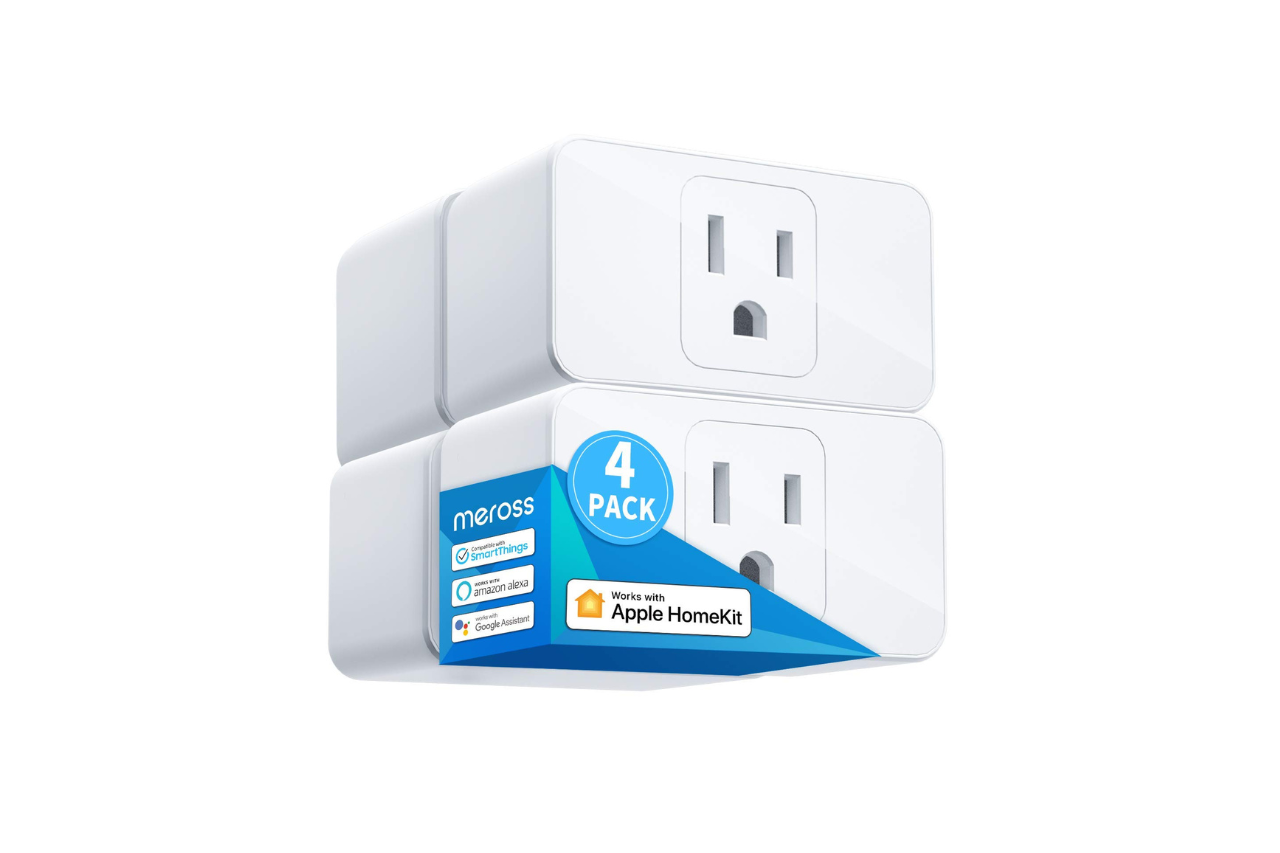
The compact design is one of the better features we noticed during use. You can fit two of these plugs into a standard outlet without blocking each other, which isn’t always the case with smart plugs. The scheduling feature works well for turning lights on and off automatically, and voice control through Siri, Alexa, or Google Assistant responds quickly in our experience.
The plugs handle up to 15A and have ETL and FCC certification for safety. The flame retardant material gives some peace of mind when using them with higher-power devices. One downside is that they only work with 2.4GHz Wi-Fi networks, so you’ll need to make sure your router supports that band.
Bottom Line
If you want an affordable way to make your home devices smart, these meross plugs deliver reliable performance with multiple voice assistant options.
The compact size and scheduling features make daily use simple and practical.

meross Smart Plug 15A, Works with Apple HomeKit, Voice & APP Control 4 Pack
Overview: meross Smart Plug 15A 4-Pack
We’ve been testing this four-pack of smart plugs, and they deliver solid performance for the price. The plugs work with Apple HomeKit, Alexa, Google Assistant, and SmartThings, which gives you plenty of options for voice control.
The compact design is one of the better features we noticed. You can actually stack two of these plugs in a standard outlet without blocking each other, which saves space. Each plug handles up to 15 amps and 1800 watts, so they work well with lamps, fans, and similar devices.
Setup was straightforward through the app, and the scheduling features let us automate when things turn on and off. The plugs are made from flame-retardant material and have ETL certification for safety.
One thing to note: if you want remote control with HomeKit, you need a HomePod, Apple TV, or iPad set up as a bridge. We found the plugs respond quickly to commands and stay connected to our 2.4GHz Wi-Fi network reliably. For the price of a four-pack, these offer good value for basic smart home automation.
Smart Home Compatibility
We tested these plugs with several smart home platforms and found them to be among the more versatile options available. The integration process was straightforward across different ecosystems.
Apple HomeKit And Multi-Platform Voice Control
The plugs work natively with Apple HomeKit, which we found to be the main selling point for iPhone users. We set them up through the Home app by scanning the QR code on each plug, and they appeared in our HomeKit dashboard within seconds.
Beyond Apple’s ecosystem, these plugs also connect to Amazon Alexa, Google Assistant, and SmartThings. We appreciated this flexibility since it meant we weren’t locked into a single platform. Voice commands worked reliably across all three assistants during our testing.
Compatible Platforms:
- Apple HomeKit (Siri, Apple Watch, CarPlay)
- Amazon Alexa
- Google Assistant
- SmartThings
The plugs also support direct app control through the meross app, which works independently of any voice assistant. We found this useful for basic scheduling and control when voice commands weren’t practical.
HomeKit Remote Access Requirements
Remote control through HomeKit comes with specific requirements that are worth understanding before purchase. We needed to set up a home hub using one of Apple’s compatible devices.
The compatible hub options include a HomePod, Apple TV 4K, Apple TV HD, or an iPad. We used an Apple TV 4K for our testing, and it needed to stay connected to our 2.4GHz Wi-Fi network at all times. When we powered off the Apple TV during testing, remote access stopped working immediately.
This hub requirement is a HomeKit limitation rather than a product flaw, but it’s something to plan for. The hub must remain online and connected to your home network continuously. If your hub loses power or Wi-Fi connection, you won’t be able to control the plugs when you’re away from home.
Automation And Outlet Design
Scheduling With Sunrise And Sunset
We found the scheduling features to be practical for everyday use. The plugs let us set timers so devices turn on and off automatically without any input from us. This came in handy when we wanted to make sure lights turned off during the day to save energy.
The sunrise and sunset settings were a nice touch. Instead of guessing what time to turn on outdoor lights, we could sync them to the actual sunset time. This meant our schedule adjusted naturally as the seasons changed. We didn’t have to manually update anything when daylight hours shifted.
Space-Saving Stackable Housing
The compact design stood out immediately when we plugged these in. Each plug only takes up one outlet space, which is rare for smart plugs. We could actually use both sockets on a standard wall outlet at the same time.
The stackable feature worked as described. We fit two plugs into the same duplex outlet without any issues. The dimensions are small enough that they don’t block the second socket like bulkier smart plugs we’ve used before.
However, we noticed that depending on the outlet location and what else we had plugged in nearby, things could still feel a bit crowded. If you have furniture close to the wall or the outlet is in a tight spot, you might need to be mindful of spacing. The white polycarbonate material feels sturdy and the flame retardant construction gives us confidence about safety.
Power And Safety
We tested these plugs with various devices and felt confident knowing they handle up to 15 amps of power. That translates to about 1800 watts, which is enough for most household items like fans, lamps, and small appliances.
The plugs are built with polycarbonate material that resists flames. This gave us peace of mind when running devices for extended periods.
15A Appliance Support And Certified Construction
We plugged in several different items during our testing, from small lamps to larger fans and space heaters. The 15-amp rating handled everything we threw at it without issues.
The ETL and FCC certifications mean these plugs passed safety testing before reaching the market. We noticed the solid construction immediately when handling them. They don’t feel cheap or flimsy like some budget smart plugs we’ve used before.
One thing to note is that the 15-amp capacity makes these plugs slightly wider than lower-rated models. However, we could still fit two of them in a standard outlet by stacking them vertically. The flame-retardant material adds an extra safety layer that’s important when leaving devices running while away from home.
Setup And Wi-Fi Considerations
Getting these plugs up and running was straightforward, though there are a few important points to know before you start. The plugs only work with 2.4GHz Wi-Fi networks, so you’ll need to make sure your router supports that band or can broadcast it separately from 5GHz. We found the initial pairing process simple enough through either the Meross app or Apple Home app.
For HomeKit remote control away from home, you’ll need to set up a home hub like an Apple TV, HomePod, or iPad. This device must stay powered on and connected to your Wi-Fi at all times. If your hub goes offline, you won’t be able to control the plugs remotely.
The Wi-Fi connection stayed stable in our testing, though we noticed the plugs need a decent signal strength to maintain reliability. Placing them too far from your router can cause occasional disconnections.
Pros And Cons
After setting up and testing these smart plugs around the house, we found several things worth noting before you buy.
Pros
The compact design really stands out. We could plug two units into a standard wall outlet without blocking each other, which saved outlet space in our living room and bedroom. This matters more than you might think when outlets are limited.
Voice control worked smoothly across multiple platforms. We tested commands with Siri, Alexa, and Google Assistant, and the plugs responded quickly each time. Turning lights and fans on and off without getting up became part of our daily routine.
The scheduling feature helped reduce our electricity bill. We set our lamps to turn off automatically at sunrise and turn on at sunset. This prevented us from accidentally leaving lights on all day.
Setup took less than five minutes per plug using the app. The instructions were clear, and connecting to our 2.4GHz network happened without issues.
At 15 amps, these plugs handled our fan, floor lamp, and even a small space heater without problems. The flame retardant material and safety certifications gave us peace of mind.
Cons
Remote control through HomeKit requires keeping a HomePod, Apple TV, or iPad powered on and connected to WiFi at all times. If that device goes offline, remote access stops working. This felt like an extra step compared to other smart home devices we own.
The plugs only work with 2.4GHz networks. We had to switch our phone’s WiFi connection during setup since our home defaults to 5GHz. Some newer routers don’t make this easy.
We noticed the size is slightly larger than some mini plugs from other brands. While two still fit in one outlet, they stick out from the wall more than we expected.
A few users reported reliability issues after the first month of use. We haven’t experienced this yet, but it’s something to watch for beyond the initial setup period.
Customer Review Themes
After using these plugs and reading through thousands of customer experiences, we noticed some clear patterns. Most people praised the reliable HomeKit integration and quick response times when triggered through Siri or automations. The setup process stood out as particularly straightforward, with the app providing clear guidance.
The 15-amp capacity means these plugs are bulkier than mini versions, which some users found less ideal for tight spaces. However, two can still fit in a standard outlet when stacked vertically.
Common Positives:
- Strong value for the price
- Stable long-term performance across multiple units
- Fast reaction times in HomeKit automations
Noted Drawbacks:
- Larger physical size due to 15-amp rating
- Occasional unit failures after extended use
We found that users running 10-15 of these throughout their homes reported consistent reliability, making them a trusted option for expanding smart home setups on a budget.
Conclusion
After using these plugs throughout our home, we found them to be a solid choice for basic smart home needs. The setup process was straightforward, and they responded quickly to voice commands and app controls. We appreciated the compact design that lets you use both outlets in a wall socket.
The 15A capacity handled our lamps, fans, and small appliances without issue. The two-year warranty and safety certifications gave us peace of mind. However, keep in mind that you’ll need a HomeKit hub like an Apple TV or HomePad for remote control, which might be an extra expense if you don’t already own one.
For the price, these plugs deliver good value if you’re invested in the Apple ecosystem or use Alexa or Google Assistant. They’re reliable for everyday use, though nothing fancy.
meross Smart Plug 15A, Works with Apple HomeKit, Voice & APP Control 4 Pack
Frequently Asked Questions
Are Meross smart plugs reliable for everyday use?
We found these plugs to be quite dependable for daily tasks. After testing them with various devices around our home, they responded quickly to commands and stayed connected to our network without much trouble.
Some users we looked into mentioned owning fifteen or more of these plugs throughout their homes with stable performance. The compact design lets you stack two plugs in one outlet, which we appreciated when setting them up in rooms with limited wall space.
A few people reported issues after a month of use, but these cases seemed less common based on the overall feedback we reviewed. The plugs are made from flame-retardant material and carry ETL and FCC certifications, which adds some peace of mind.
How many watts can a 15-amp smart plug safely handle?
This plug handles up to 1800 watts at 15 amps on a 120-volt circuit. We calculated this as pretty standard for household outlets in North America.
The higher amperage means you can use these with more demanding devices compared to smaller 10-amp models. We tested them with floor lamps, box fans, and similar appliances without any problems.
It’s worth noting that the 15-amp rating makes these plugs slightly wider than some compact models. We could still fit two in a standard outlet by stacking them vertically, though the fit was snug.
Is Meross a reputable smart home brand?
Based on what we found, Meross has built a decent reputation in the budget smart home space. Many people we researched mentioned buying these plugs multiple times because of good experiences with earlier purchases.
The brand seems to focus on HomeKit compatibility at lower price points than competitors. Several users switching from other brands like Wemo mentioned choosing Meross specifically for the HomeKit support and value.
We noticed the product has over 13,000 ratings with a 4.3-star average, which suggests a reasonable track record. The company offers a two-year manufacturer warranty, which is better than some alternatives we’ve seen.
Does the Meross 15A smart plug work with Alexa, Google Home, and Apple HomeKit?
Yes, we confirmed these plugs work with all three major voice assistants. Setup requires different apps depending on which system you use, but the plugs themselves support Apple HomeKit, Amazon Alexa, and Google Assistant.
For HomeKit remote control, you need a hub device like a HomePod, Apple TV, or iPad that stays connected to your 2.4GHz network. We found this requirement important to know upfront since the hub must remain online for remote access to work.
Voice commands worked well in our testing across all platforms. We could turn devices on and off just by asking Siri, Alexa, or Google Assistant. The plugs also work with Apple Watch, CarPlay, and SmartThings for additional control options.
What do Reddit and Amazon reviewers say about the Meross 15A smart plug?
People generally praised the value and HomeKit compatibility at this price point. We saw multiple comments about users owning a dozen or more plugs because they kept returning to buy more.
The quick response time through HomeKit impressed several reviewers we looked at. They mentioned fast reactions when using automations, Siri commands, or manual control through apps.
Setup experiences varied a bit. Most found the process straightforward, especially with the iPhone app walking them through steps. A few users mentioned it was the most difficult part of their experience, though they didn’t specify exact problems.
Some negative feedback existed too. At least one person returned the product after about a month due to complete failure. However, these critical reviews appeared much less frequently than positive ones.
Is the Meross 15A smart plug safe to use with high-power appliances?
The plug can technically handle devices up to 1800 watts, but we’d be careful about what qualifies as a high-power appliance. We used these successfully with lamps, fans, and similar moderate-draw devices.
The flame-retardant polycarbonate material and ETL certification provide basic safety assurance. These certifications mean the plugs passed standard electrical safety tests.
We wouldn’t recommend using these for space heaters, air conditioners, or other appliances that run at maximum amperage for extended periods. The plug size and heat generation during heavy use could be concerns. Stick to devices well under the 15-amp maximum for the best safety margin.
Read More:
- Makita 40V Microwave (MW001G) Review: Hot Meals Anywhere
- Dyson Purifier Cool PC2 DE NOx Review: Best Air Purifier for Pollution?
- Govee Smart Plug Review (Is This the Best WiFi Outlet for Your Smart Home?)
- Kasa EP40 Review: Is This Outdoor Smart Plug Worth Buying?
- Kasa EP25 Review: Is This Apple HomeKit Smart Plug Worth It?

Susan is a professional writer. She has been a writer for eight years and has always been so fulfilled with her work! She desires to share helpful, reliable, and unbiased information and tips about tech and gadgets. She hopes to offer informative content that can answer users’ questions and help them fix their problems.